
Appearance
Origin–destination flows
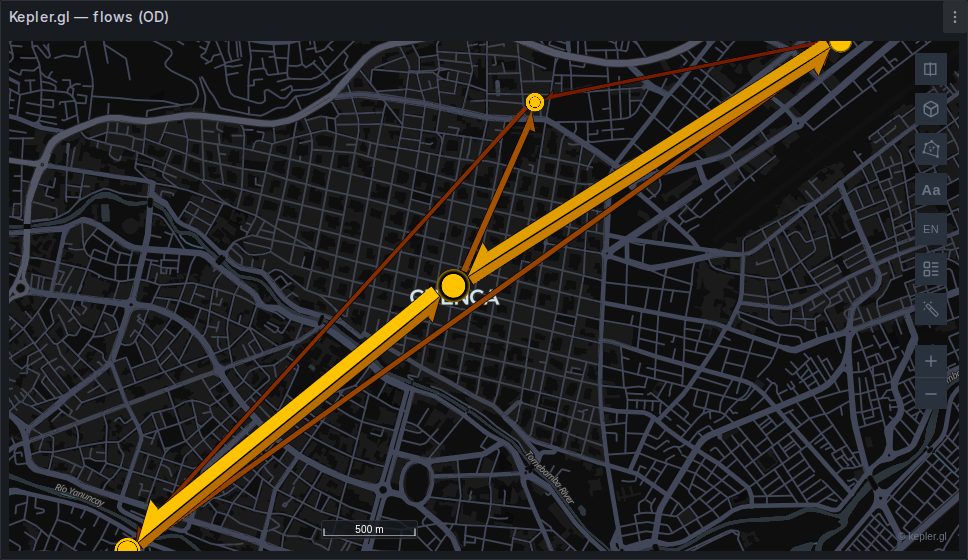
A flat table of origins and destinations becomes an animated flow map automatically. kepler does not auto-detect flows the way it does points and geometry, so the panel emits the layer itself.
sql
SELECT o.lat AS origin_lat, o.lon AS origin_lon,
       d.lat AS dest_lat,   d.lon AS dest_lon,
       COUNT(*) AS trips
FROM trips t
JOIN zones o ON o.id = t.origin_zone
JOIN zones d ON d.id = t.dest_zone
GROUP BY 1, 2, 3, 4;
One row is one flow. The trips column becomes its magnitude.
The two ways to say where
A flow layer takes either a pair of coordinate pairs or a pair of H3 indices. When a query carries both, H3 wins — a hexagon flow is the more specific description of the same movement.
Coordinate pairs
| Role | Detected from |
|---|---|
| Origin lat | origin_lat, origin_latitude, from_lat, start_lat, source_lat, pickup_lat, lat0 |
| Origin lng | origin_lon, origin_lng, origin_long, origin_longitude, from_lon, from_lng, start_lon, start_lng, source_lon, source_lng, pickup_lon, pickup_lng, lng0, lon0 |
| Dest lat | dest_lat, dest_latitude, destination_lat, to_lat, end_lat, target_lat, dropoff_lat, lat1 |
| Dest lng | dest_lon, dest_lng, dest_long, dest_longitude, destination_lon, destination_lng, to_lon, to_lng, end_lon, end_lng, target_lon, target_lng, dropoff_lon, dropoff_lng, lng1, lon1 |
The lists are long because the naming conventions in the wild are: pickup/dropoff from taxi data, from/to from network tables, source/target from graph exports, lat0/lat1 from kepler's own convention. All four roles must resolve — three of four is not a flow.
H3 pairs
| Role | Detected from |
|---|---|
| Origin H3 | origin_h3, source_h3, from_h3, h3_0 |
| Destination H3 | dest_h3, target_h3, to_h3, h3_1 |
sql
SELECT h3_from AS origin_h3,
       h3_to   AS dest_h3,
       COUNT(*) AS trips
FROM journeys
GROUP BY 1, 2;
These four roles are autodetect-only
originH3, destH3 and the two velocity pairs are not exposed in the Field mapping editor, which offers twelve of the twenty-one roles. If your H3 columns are called something the list above does not cover, alias them in the query — SELECT h3_pickup AS origin_h3 — rather than looking for a dropdown. See Field roles.
Magnitude
| Role | Detected from |
|---|---|
| Count | count, trips, magnitude, weight, flow, total, volume |
Optional. Without it every flow is drawn with the same weight, which is occasionally what you want — a network diagram rather than a volume map — but usually is not.
Aggregate before the map. A million individual journeys between two hundred zones is at most forty thousand flows after a GROUP BY, and the map cannot show you the difference anyway.
Line style
Flow line style in the panel options picks how the lines are drawn:
| Value | Reads as |
|---|---|
| Straight (default) | a clean network; easiest to read when flows are dense |
| Curved | separates the two directions of a pair, so A→B and B→A do not overlap |
| Animated | direction is unmistakable; costs a little rendering, and moves in a dashboard |
Curved is worth reaching for the moment your data is bidirectional. Straight lines between the same two points sit exactly on top of each other and a strong A→B flow becomes indistinguishable from a balanced pair.
Reading a flow map
Colour, width scaling and the magnitude thresholds all live in kepler's layer panel, as they would for any layer.
One flow-specific setting is worth knowing before you go hunting for a bug: Max Top Flows defaults to 5,000. Hand the layer more flows than that and the smallest ones are simply not drawn. If a flow you expected is missing from a dense map, raise that number — or, better, aggregate harder in SQL — before suspecting detection.
Why this needs a pre-release kepler
The Flow layer arrived in kepler.gl's 3.3.0 line and exists nowhere in the 3.2 stable release. That is the reason the plugin pins 3.3.0-alpha.11 rather than the stable version, and the reason the layer is enabled explicitly at startup rather than relying on the upstream default. See Differences from stock kepler.gl.